
How MCP Actually Changed My Work and Life

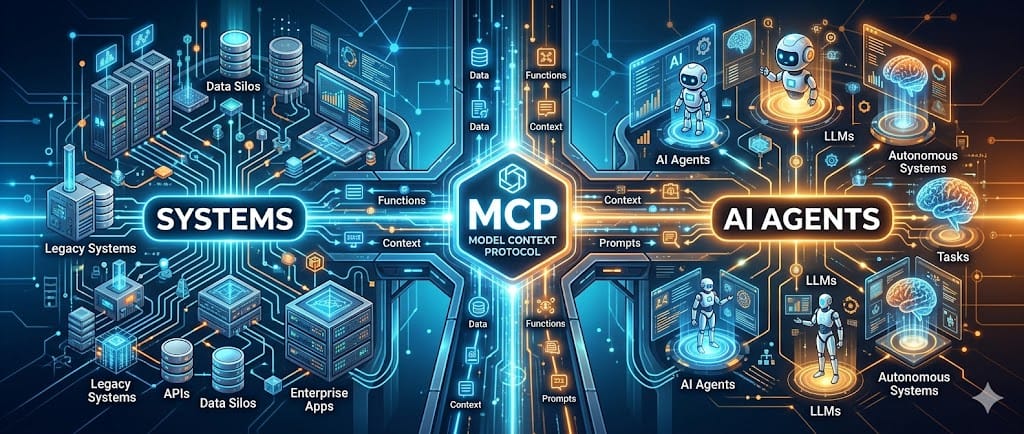
I was one of the sceptical AI tool adopters. Models got better, but MCP is what actually got me started. It's not new, and I'm not the first to use it, but I want to show how it actually makes your work and private life easier.
I began with just Backstage MCP for work. Now I use a dozen, and they've crept into my private life: meal planning, blogging, the works. Here's why.
At first, it was just about making work easier. Then I realized: if it's good enough for my job, it's good enough for my life. The same tools that help me manage tech radars and RFCs now help me plan what's for dinner.
The Problem
An LLM and chatbot is only great for copy-paste in and out. But that's it, you can't give it a task and expect it to do things on its own. Without tool calls, you're limited to stale data and whatever the model can do. Web search is already baked into agents and chatbots as a tool, but that's just the start. MCP unlocks everything you can imagine, and everything you can code. Whether you're a builder or an engineer with AI tooling, it doesn't matter.
Enter MCP
So what is MCP? It's the Model Context Protocol, a standard for connecting AI to tools (see the official docs at https://modelcontextprotocol.io/docs/getting-started/intro). Think of it as the missing link between your LLM and the actual things you want to get done. It's the thing that makes AI tools actually do things.
Of course, the agents, and chatbots you use as of today have already some tools built-in like web-search, loading pages and scraping content. However, for anything custom or your infrastructure, you are on our own by default.
My workflow for work
At work, it's the same principle but with different tools:
Backstage MCP with custom action backends exposes our TechDocs content and search, tech radar, and even AI tools themselves including MCP servers. The result? You can discover more MCP servers through MCP. The scaffolder is especially powerful, creating projects and new templates right from AI assistants, or just applying them. It's neat to integrate with skills and agentic workflows, and it keeps our internal ecosystem connected and growing.
Atlassian MCP server handles Jira for ticket work and Confluence for RFCs, proposals, and documents.
The native Slack connector by claude.ai gives me recaps, insights, and sentiment analysis from our company channels.
chrome-devtools-mcp enables closed-loop frontend development, allowing me to control Chrome in an isolated context. I also use it for screenshots to make MRs more reviewer-friendly.
MCP is more portable than CLI calls, it works in browser, and stdio with gateway. So even the tools that haven't caught up yet can still be part of the system.
Using MCP in my day-to-day life
It started with work, but quickly spilled over. Here's how MCP actually changes my daily life.
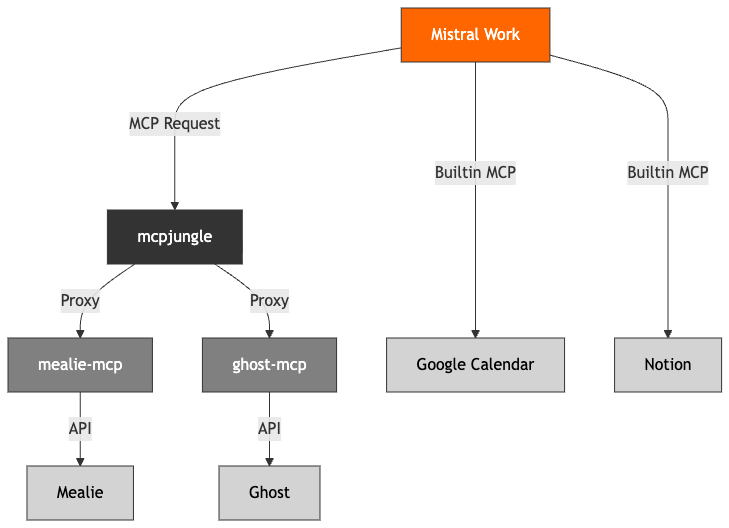
mcpjungle is my central hub for everything that is not native to the agent platforms I use, a basic MCP gateway that glues all my servers into one surface, especially for the ones that don't have remote and OAuth, even the stdio ones from my local machine. One config to rule them all. I mainly use it with Mistral Chat/Work (better mobile app integration) and Open Code for private projects. I used to use Claude Code for both work and private stuff, but low rate limits on my private account, rising Claude (Code) costs and increased rate limiting, and my expired employer-sponsored Claude sub changed that.
mealie-mcp-server is my custom server for Mealie, which I use for meal planning and recipe management. It is inspired by rldiao's version, but completely rewritten to fix concurrency issues and add batching. The original was just too slow for effective meal planning.
For everything else: Google Calendar (native integration with Mistral) keeps my schedule in check, ghost-mcp helps me manage my blog posts, and Notion (native integration with Mistral) scrapes my notes and to-do lists.
Lessons & Reality Check
What works: discoverability, standardization. When everything speaks the same language, finding and using tools becomes trivial.
What's rough: server quality varies, authentication complexity can be a nightmare.
MCP gateway is still quite a complex topic, even for private use. mcpjungle is manageable because I built a custom entry point that allows git ops + docker compose on my vServer + aggressively limiting access to API surface.
When to adopt: if you have integration pain, start small. You don't need to boil the ocean, just solve one problem at a time.
Create Your Own
It's easy. Seriously. Pick one tool or API, integrate it via MCP, and watch your workflow transform. The ecosystem is growing fast, documentation is solid, and you don't need to be an expert to get started. Just solve one problem at a time.